[fusion_builder_container admin_label=”” hundred_percent=”no” equal_height_columns=”no” menu_anchor=”” hide_on_mobile=”small-visibility,medium-visibility,large-visibility” class=”” id=”” background_color=”” background_image=”http://groupturbo.com/newsiteturbo/wp-content/uploads/2017/11/turbo_texture.jpg” background_position=”center center” background_repeat=”no-repeat” fade=”no” background_parallax=”none” enable_mobile=”no” parallax_speed=”0.3″ video_mp4=”” video_webm=”” video_ogv=”” video_url=”” video_aspect_ratio=”16:9″ video_loop=”yes” video_mute=”yes” video_preview_image=”” border_size=”” border_color=”” border_style=”solid” margin_top=”” margin_bottom=”” padding_top=”20px” padding_right=”” padding_bottom=”20px” padding_left=””][fusion_builder_row][fusion_builder_column type=”1_1″ layout=”1_1″ spacing=”” center_content=”no” hover_type=”none” link=”” min_height=”” hide_on_mobile=”small-visibility,medium-visibility,large-visibility” class=”” id=”” background_color=”” background_image=”” background_position=”left top” undefined=”” background_repeat=”no-repeat” border_size=”0″ border_color=”” border_style=”solid” border_position=”all” padding_top=”0px” padding_right=”20px” padding_bottom=”0px” padding_left=”20px” margin_top=”” margin_bottom=”” animation_type=”” animation_direction=”left” animation_speed=”0.3″ animation_offset=”” last=”no”][fusion_text columns=”” column_min_width=”” column_spacing=”” rule_style=”default” rule_size=”” rule_color=”” class=”” id=””]
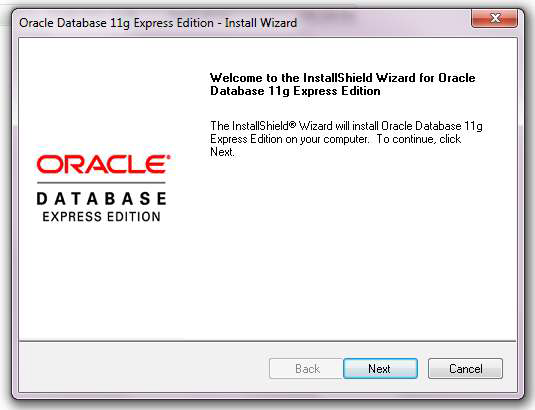
To install Oracle Database XE 11.2 you must be logged in as an administrator on your computer.
You can find the software on the official Oracle page : http://www.oracle.com/technetwork/database/database-technologies/express-edition/downloads/index.html.
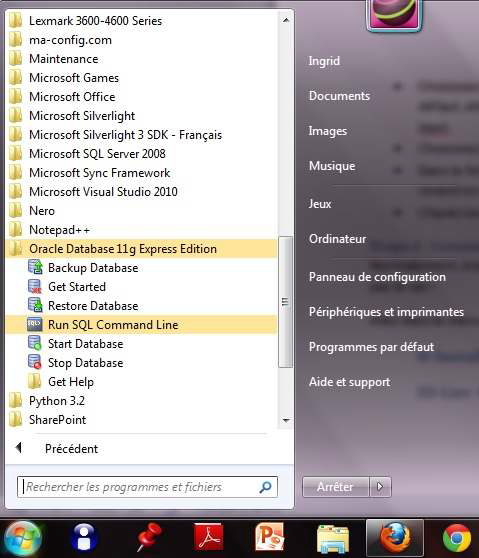
Normally, at the end of the installation, the database is an operator and is started. If it’s not the case :
To stop the base, you have to click on Stop Database.
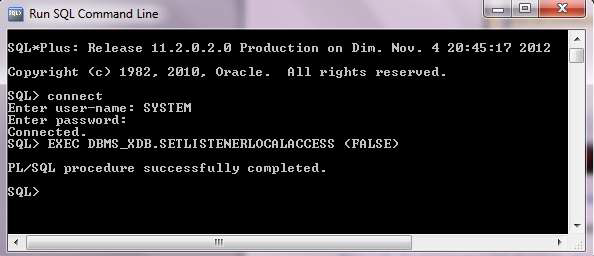
In the Start menu – All Programs – Oracle Database 11g Express Edition, click Run SQL Command Line.
In the command line, type:
The message Connected appears.
To make your database accessible by remote clients, type the command: EXEC DBMS_XDB.SETLISTENETLOCALACCES (FALSE)..
Source: click here
[/fusion_text][/fusion_builder_column][/fusion_builder_row][/fusion_builder_container]
Turbo School Turbo School TURBO SCHOOL is flexible use and can provide good governance at…
E-Declaration E-Declaration The system has an array of control elements to ensure the consistency of…
SIGAC Système Intégré de Gestion d’Assurances Contre Tiers The system provides some basic online services…
IMTS International Money and Goods Transfer Integrated Management System ( IMTS) Software to manage the…
GCC Gestion de Caisse et de Comptes Courants The Cash and Current Account Management System…
View Comments
I think this tutorial is verry useful